ማሽኑን ማብራት እና ማጥፋት
ይህ ክፍል የእርስዎን ነካ እንዴት ማብራት፣ ማጥፋት እና በማይጠቀሙበት ጊዜ ወደ እንቅልፍ ሁነታ (sleep mode) መቀየር እንደሚችሉ ያብራራል።
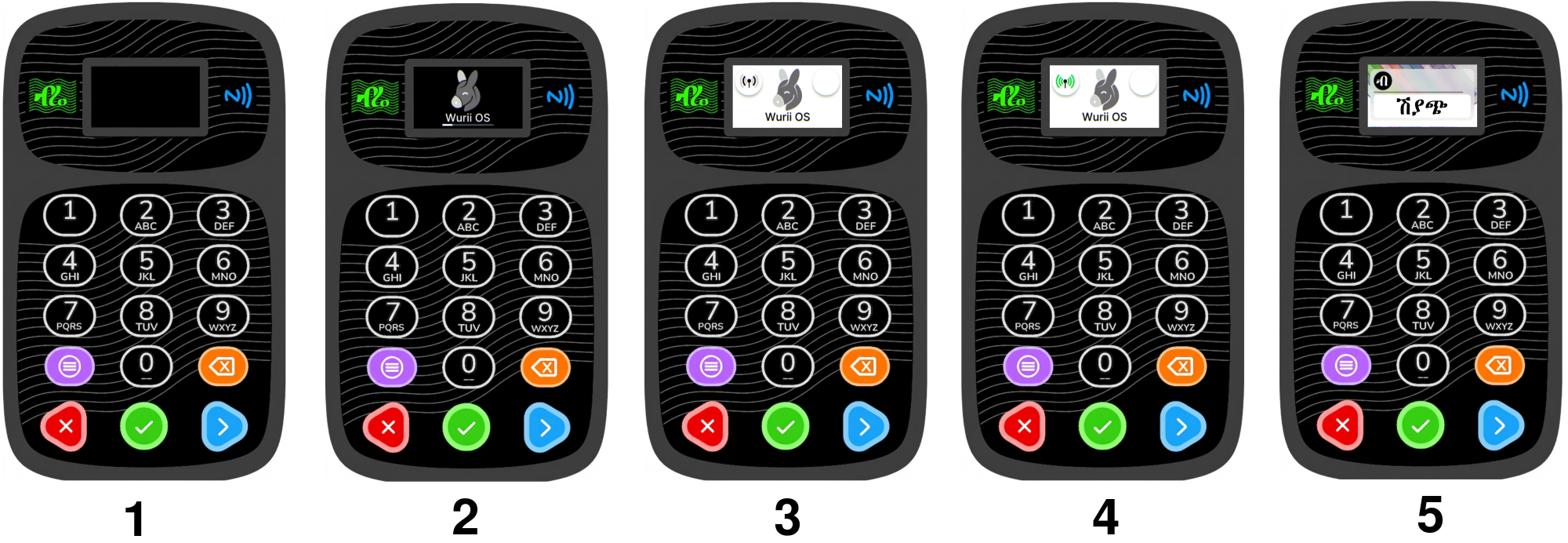
ማሽኑን ማብራት
- ማሽኑ ጠፍቶ እያለ፣ በመጀመሪያው የመቀስቀሻ ደረጃ (stage 1) ምስል ላይ እንደተመለከተው የመካከለኛውን ቁልፍ (ቁልፍ 7) ተጭነው ይቆዩ።
- የ"ቢፕ" ድምፅ ሲሰሙ ጣትዎን ከቁልፉ ላይ ያንሱ።
- ማሽኑ መነሳት ይጀምራል። በሁለተኛው ደረጃ (stage 2) ምስል ላይ እንደተመለከተው የWurii OS መጫኛ ስክሪን ይታያል።
- ማሽኑ መጫኑን እንደጨረሰ፣ በሦስተኛው ደረጃ (stage 3) ምስል ላይ እንደተመለከተው ከኔትወርክ ጋር ለመገናኘት ይሞክራል።
- ማሽኑ ከኔትወርክ ጋር በተሳካ ሁኔታ ከተገናኘ፣ በአራተኛው ደረጃ (stage 4) ምስል ላይ እንደተመለከተው የኔትወርክ መፈለጊያ ምልክቱ ወደ አረንጓዴነት ይቀየራል፤ ከዚያም በአምስተኛው ደረጃ (stage 5) ምስል ላይ ወደተመለከተው መነሻ ማውጫ (home menu) ይወስደዎታል። ከኔትወርክ ጋር መገናኘት ካልቻለም በቀጥታ ወደ መነሻ ማውጫው ይገባል።
ምክር፦ ማሽኑ ከኔትወርክ ጋር መገናኘት ካልቻለ፣ ወደ GPRS ማስተካከያ (GPRS settings) በመሄድ ለማገናኘት ይሞክሩ።
ማሽኑን ማጥፋት
የእርስዎን ነካ ደኅንነቱ በተጠበቀ ሁኔታ ለማጥፋት፦
- ከመነሻ ማውጫው (home menu) ላይ እያሉ፣ የግራ እና የቀኝ ቁልፎችን (ቁልፍ 8 እና 6) በመጠቀም ወደ ቅንብሮች (Settings) ማውጫ ይሂዱ።
- ወደ ማስተካከያ (Settings) ለመግባት የመካከለኛውን ቁልፍ (ቁልፍ 7) ይጫኑ።
- ወደ ቀኝ መሳሪያውን ዝጋ (Power Off) ማውጫ ላይ ይድረሱ፤ ከዚያም ለማረጋገጥ የመካከለኛውን ቁልፍ (ቁልፍ 7) ይጫኑ።
- ማሽኑ በአግባቡ ይዘጋል፤ ስክሪኑም ይጠፋል።
ማስጠንቀቂያ፦ ማሽኑን ለማጥፋት ሁልጊዜ ይህንን የ"ማጥፊያ (Power Off)" አማራጭ ይጠቀሙ።
የእንቅልፍ ሁኔታ
ማሽኑን ሙሉ በሙሉ ሳያጠፉ የባትሪ ዕድሜን ለመቆጠብ ከፈለጉ፣ ወደ እንቅልፍ ሁነታ (sleep mode) መቀየር ይችላሉ፦
- ከመነሻ ማውጫው (home menu) ላይ እያሉ የግራ ቁልፍን (ቁልፍ 8) ለጥቂት ሰከንዶች ተጭነው ይቆዩ።
- ስክሪኑ ይቆለፋል፤ ማሽኑን አነስተኛ ኃይል ወደሚጠቀምበት የእንቅልፍ ሁነታ ይሸጋገራል።
ማሽኑን ከተኙበት ለመቀስቀስ፦
- የመካከለኛውን ቁልፍ (ቁልፍ 7) ይጫኑ።
ማሳሰቢያ፦ ማሽኑን ለተወሰነ ጊዜ ምንም ዓይነት እንቅስቃሴ ካላገኘ በራስ-ሰር ወደ እንቅልፍ ሁነታ ይገባል። ይህንን የጊዜ ገደብ በ ማስተካከያ (Settings) > ስክሪን መቆለፊያ (Screen Lock) ውስጥ ማስተካከል ይችላሉ።
የሚቀጥሉ እርምጃዎች
አሁን ማሽንዎን እንዴት ማብራት እና ማጥፋት እንደሚችሉ ስላወቁ፣ ወደ የመጀመሪያ ደረጃ ማዋቀር (Initial Setup) ለመቀጠል ዝግጁ ነዎት።
➡️ ወደ የመጀመሪያ ደረጃ ማዋቀር ይቀጥሉ
Powering On/Off
This section shows you how to turn your NEKA on, turn it off, and put it to sleep when you are not using it.
Turning the Device On
- Press and hold the middle key (button 7) while the device is off, as shown in boot step image stage 1.
- When you hear a beep, lift your finger off the key.
- The device will start up automatically. You will see the Wurii OS loading screen, as shown in boot step image stage 2.
- Once loading is done the device tries to lock onto the network, as shown in boot step image stage 3.
- If the device locks onto the network, you will see the signal searching icon turn green, as shown in boot step image stage 4 and the device will to the home menu as shown in boot step image stage 5. If it cannot lock onto the network, the device will go directly to the home menu.
Tip: If the device does not lock onto the network, try going to the GPRS settings to connect manually.
Turning the Device Off
To safely power off your NEKA:
- From the home menu, use the left and right keys (buttons 8 and 6) to navigate to the Settings menu.
- Press the middle key (button 7) to enter Settings.
- Scroll right untill you reach Power Off menu then press middle key (button 7) to confirm.
- The device will shut down cleanly. The screen will turn off.
Warning: Always use the Power Off option to turn off the device.
Sleep Mode
If you want to save battery without fully turning off the device, you can put it into sleep mode:
- From the home menu, press and hold the left key (button 8) for a few seconds.
- The screen will lock, and the device will enter a low‑power sleep state.
To wake the device:
- Press the middle key (button 7).
Note: Sleep mode is also activated automatically after a period of inactivity. You can adjust the timeout in Settings > Screen Lock.
Next Steps
Now that you know how to power your device on and off, it's time to go through the Initial Setup.
➡️ Continue to Initial Setup