የባትሪ አያያዝ
ውሪ ነካ የሚሠራው እንደገና በሚሞላ (rechargeable) ባትሪ ነው። ትክክለኛ የባትሪ አያያዝ የባትሪውን ዕድሜ ለማራዘም እና መሣሪያው በአስተማማኝ ሁኔታ እንዲሠራ ለማድረግ ይረዳል።
የባትሪ ደረጃ አመልካች
የባትሪው ደረጃ በማስተካከያ (Settings) ስክሪን አናት ላይ በሚገኘው የሁኔታ ባር (status bar) ላይ ይታያል።
| ምልክት (Icon) | ደረጃ | መግለጫ |
|---|---|---|
 5 bars 5 bars |
80–100% | ሙሉ በሙሉ የተሞላ። |
 4 bars 4 bars |
60–79% | በጥሩ ሁኔታ የተሞላ። |
 3 bars 3 bars |
40–59% | መካከለኛ ደረጃ። |
 2 bars 2 bars |
20–39% | ዝቅተኛ ደረጃ። |
 1 bar 1 bar |
5–19% | በጣም ዝቅተኛ – በቅርቡ ይሙሉት። |
የባትሪ መቀነስ ማስጠንቀቂያዎች
| ማስጠንቀቂያ | ትርጉሙ | ምን መደረግ አለበት? |
|---|---|---|
| ባትሪ ቀንሷል (20%) | የባትሪው ኃይል እየቀነሰ ነው። | መሣሪያውን በቅርቡ ቻርጅ ያድርጉት። |
| ባትሪው በጣም ወርዷል (5%) | የባትሪው ኃይል በጣም ዝቅተኛ ነው። | መሣሪያውን ወዲያውኑ ቻርጅ ያድርጉት። |
| እየጠፋ ነው (0%) | ባትሪው ሙሉ በሙሉ አልቋል። | መሣሪያው በራሱ ጊዜ ይጠፋል። |
ማስታወሻ፦ የባትሪው መቶኛ (percentage) በጣም በሚቀንስበት ጊዜ መሣሪያው ድምፅ ያሰማል እንዲሁም እርስዎን ለማስጠንቀቅ/ለማስታወስ ከታች ያለውን ስክሪን ያሳያል።
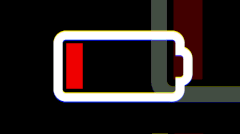
ማስጠንቀቂያ፦ የባትሪው መጠን 0% ላይ ከደረሰ መሣሪያው በራሱ ጊዜ ይጠፋል።
የባትሪ ዕድሜን ለማራዘም የሚረዱ ምክሮች
| ጠቃሚ ምክር | መግለጫ |
|---|---|
| የስክሪን ብርሃን መቀነስ | በ ማስተካከያ (Settings) > ስክሪን (Screen) ውስጥ የስክሪኑን የብርሃን መጠን መቀነስ። |
| የስክሪን መጥፊያ ሰዓትን ማሳጠር | በ ማስተካከያ (Settings) > ስክሪን (Screen) ውስጥ አጭር የራስ-ሰር መቆለፊያ (auto-lock)። |
| ፕሪንተሩን ማጥፋት | ፕሪንተሩ አገልግሎት ላይ በማይውልበት ጊዜ በራሱ ጊዜ ይጠፋል። |
| ዋይፋይ (WiFi) መጠቀም | ዋይፋይ አገልግሎት ላይ በማይውልበት ጊዜ በራሱ ጊዜ ይጠፋል። |
| የእንቅልፍ ሁኔታ (Sleep mode) | መሣሪያው አገልግሎት ላይ በማይውልበት ጊዜ ወደ እንቅልፍ ሁኔታ እንዲቀየር ማድረግ (በመነሻ ማውጫ [home menu] ላይ እያሉ የግራ ቁልፍን [Left key] ተጭነው ይቆዩ)። |
የባትሪ ጤንነትን መፈተሽ
መሣሪያው የባትሪውን ጤንነት በራሱ ይከታተላል። ባትሪው ኃይል መያዝ ካቆመ የሚከተሉት ምልክቶች ሊታዩ ይችላሉ፦
- የባትሪ ኃይል በፍጥነት መሟጠጥ።
- መሣሪያው ሳይታሰብ በራሱ ጊዜ መጥፋት።
- መሣሪያው ቻርጅ ተደርጎም እንኳ አለመብራት።
ከእነዚህ ችግሮች መካከል አንዱ እንኳን ካጋጠመዎት የቴክኒክ ድጋፍ ቡድናችንን ያነጋግሩ።
ባትሪን ስለማስቀመጥ
መሣሪያውን ለረጅም ጊዜ የማይጠቀሙበት ከሆነ፦
- ከመቀመጡ በፊት የባትሪውን መጠን 50–60% ያድርሱት።
- ወደ ማስተካከያ (Settings) -> ማጥፊያ (Power Off) በመሄድ መሣሪያውን ያጥፉት።
- መሣሪያውን ቀዝቃዛ እና ደረቅ በሆነ ቦታ ያስቀምጡት።
- ባትሪው ሙሉ በሙሉ ተሟጦ እንዳይበላሽ (deep discharge) ለመከላከል በየ 3–6 ወሩ ቻርጅ ያድርጉት።
ማስታወሻ፦ የባትሪ ኃይል ሙሉ በሙሉ ተሟጦ ለረጅም ጊዜ መቆየት (Deep discharge) ባትሪውን እስከመጨረሻው ሊያበላሸው ይችላል።
የሚቀጥሉ እርምጃዎች
መሣሪያውን እንዴት ቻርጅ ማድረግ እንደሚቻል ይማሩ።
➡️ ወደ ቻርጅ ማድረግ (Charging) ይቀጥሉ
Battery Management
The Wurii NEKA is powered by a rechargeable battery. Proper battery management ensures long battery life and reliable operation.
Battery Level Indicator
The battery level is shown in the status bar at the top of the Settings screen.
| Icon | Level | Description |
|---|---|---|
| 5 bars |
80–100% | Full charge. |
| 4 bars |
60–79% | Good charge. |
| 3 bars |
40–59% | Medium charge. |
| 2 bars |
20–39% | Low charge. |
| 1 bar |
5–19% | Very low – charge soon. |
Low Battery Warnings
| Warning | What It Means | What to Do |
|---|---|---|
| Low battery (20%) | Battery is running low. | Charge the device soon. |
| Battery critical (5%) | Battery is very low. | Charge the device immediately. |
| Shutting down (0%) | Battery is empty. | The device will turn off automatically. |
Note: When battery percentage gets very low the device will beep and show the below screen to warn/remind you.
Warning: If the battery reaches 0%, the device will shut down.
Extending Battery Life
| Tip | Description |
|---|---|
| Reduce brightness | Lower screen brightness in Settings > Screen. |
| Shorten screen timeout | Set a shorter auto-lock time in Settings > Screen. |
| Turn off printer | The printer turns off automatically when not in use. |
| Use WiFi | WiFi turns off automatically when not in use. |
| Sleep mode | Put the device to sleep when not in use (press and hold Left key while on home menu). |
Checking Battery Health
The device automatically monitors battery health. If the battery is not holding a charge, you may see:
- Rapid battery drain.
- Unexpected shutdowns.
- The device does not turn on even when charged.
If you experience any of these issues, contact support.
Battery Storage
If you are not using the device for an extended period:
- Charge the battery to 50–60% before storage.
- Turn off the device by going to Settings -> Power Off.
- Store the device in a cool, dry place.
- Charge the battery every 3–6 months to prevent deep discharge.
Note: Deep discharge can permanently damage the battery.
Next Steps
Learn how to charge the device.
➡️ Continue to Charging